

Have you been asked to write a “speaker bio” or “author profile”? My reaction is ….
<sigh>groan</sigh>. Writing about oneself objectively and neutrally (especially in the third person) can be an uncomfortable task. I know about a “Goldilocks profile” (not too hot, not too cold, but just right). But… if I’m frank, I’ve never found that perfect bio profile.
Today, I’m trying something different. If a picture is worth 1000 words, maybe I should be thinking about visuals before words? Photograph albums are a preservation mechanism to represent our own background (usually favourably). Or take a “walking through ruins” (Harman) approach and collect pics of derelict factories, hijacked cities, abandoned towns or littered rivers. This introduces a critical awareness of how smoothed and regulated many spaces seem to be on our screens.
Then openly share your photos (with some sort of consistent theme), on Wikimedia Commons. If someone Googles you, they’ll find a bank of themed pics about you or your choice of metaphor on the knowledge panel. Or if your concern is not personal or critical, but simply educational. You could have a sequence of pictures on commons that appear in a slideshow.
A FMD theme
I mentioned this on Instagram. South Africa lost its FMD (foot and mouth disease) free status in 2019. This nasty cattle disease is spreading (we have had first hand experience of it). Folks in cities, who become country tourists for a week or two, don’t really know how to co-operate or are aware of this highly contagious disease. This is when I think that Wikimedia Commons is a great spot to share educational pictures and instructions for others to understand. Upload educational pics to Wikimedia Commons. Arrange them in some order. Share instructions in vernacular language on Wikipedia. And make sure your business has the know how to address the issue.
Ten step workflow for uploading images
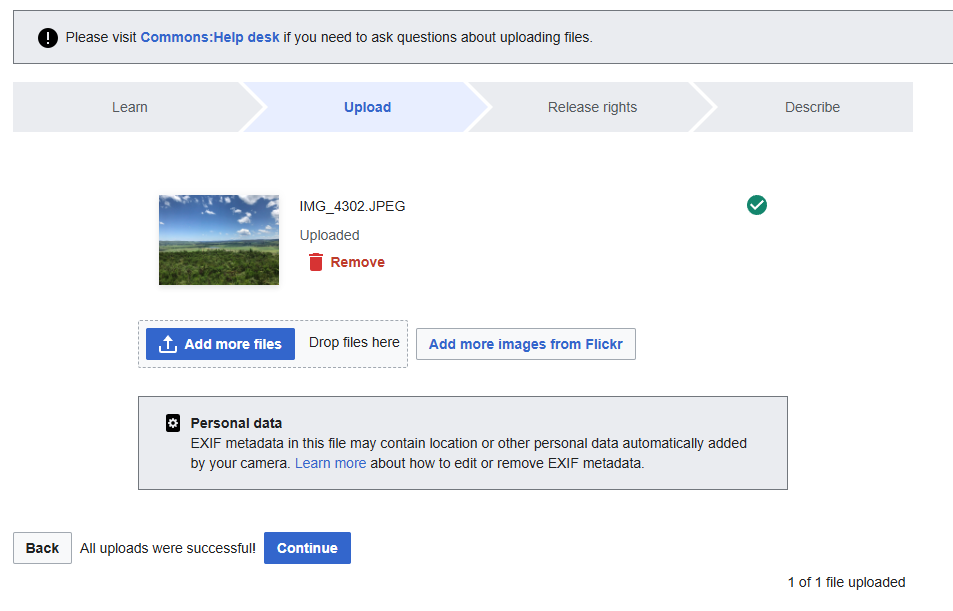
Here are ten steps to create a look and feel with Wikimedia Commons (adapted from Mike Dickison, CC BY 4.0 via Wikimedia Commons)
- Select a batch of photos. High quality images are best, Wikimedia does adjust. You might crop them consistently. Think about how others will see them?
- Go to the Upload Wizard Wizard. Its the blue button on commons.wikmedia.org and follow the instructions.
- Respect copyright. You will be asked if there’s any copyrighted works by someone else in the photo.
- Release rights. Think about the open licence? I prefer “CC BY” ensures you get credited whenever the photo’s reused. If you comfortable with code, you could try these templates with option 4 (of course you have to modify).
- {{attribution|User:Derek J Moore|Weblearning}}
- {{self|cc-by-4.0}}
- Choose a filename. I keep it short (and try to ensure that I have got the spelling right)
- Add a caption. The writing below an image is the caption, it places the image in a context. You have 255-characters to write the description. You might want to add a vernacular caption too?
- Published date. Select the date when the image was first published
- Describe Further. Add additional information. This is optional, but helpful for others
- Insert a Wikidata item. There should be a main subject visible in the photo. Locate the Wikidata number and add structured data
- Add a specific category. When working with a batch of photos you might want to add a category or use an existing one.
- Location. You could add the geo-coordinates (or they might appear automatically)
- MORE Additional information This is a hidden field. You might be uploading a map from open street maps. They you’d use the template {{OpenStreetMap}}
- Post and Confirm. You are ready to finalise your post. All that has been submitted can be checked and corrected
Okay. Now look at you images as they appear on other knowledge panels
- Scholia – view the scholarly profile of an academic or researcher.
- SQID – https://sqid.toolforge.org/#/view?id=Q1339
Read more hints Experiment in your sandbox. You could go ahead and design your own knowledge panel. Or you might contribute towards the list of South African heritage sites . Or do a bit of public education about important matters.
References
Edensor, Tim. (2008). Walking through ruins.
Williams, H. and Elder, R. (2024). Introducing the Wikidata Thesis Toolkit Metadata and Discovery Group Vol. 208 (2024)