
Clive van den Berg’s (Q106259021) “eland” welcomed me to Braamfontein when I came up from Pietermaritzburg for a job interview in 2009 with SAIDE (took me a while before I created their Wikipedia page). In the wild, this buck is the second biggest antelope in the world. The Kudu (I’m told is the third largest). This sculpture stands very tall alongside the entrance to the Tin Temple, Pretoria Road. (oops, these name changes always get me). In concrete, this representation of a common eland weighs 50 tons and is 7.5 metres high. Yet another security guard (or armoured car), separating the inner city from the northern suburbs? As of today (9 August 2025), “Tragelaphus oryx” does not have a Wikipedia entry. The Kudu clan does have a couple of entries in English and Afrikaans, but their isiZulu and Sesotho Wikipedia Pages are not yet touched by Phase 1. (I’m sure that SWiP can help, but maybe the Kudu bots could do it better. I digress.)

Public artworks – statues, memorials, murals, plaques, like Elkie, (Eland comes from the Dutch work elk) are notable enough to have their own Wikidata item. Our giant but common eland watch person should be no exception. He deserves some public recognition. He’s still standing up straight, unlike many of the city’s place lighting lamp posts and pace-setting traffic lights. Want to add a Wikidata item for this eland? Perhaps another place making piece of public art? Five steps and you too can insert him into the relational databases of the world’s culture vultures.
Step 1 – Find a WikiProject data model.
Wikidata can seem daunting and constructing tripple statements are bit confusing. We are all used to frameworks and not relational data. The public art data model with exemplars could act as a guide. Another place to look for inspiration is international public art examples?
Step 2 – Avoid duplication
Go to Wikipedia itself and search whether the item (the eland) has an entry. Do the same thing on Wikidata. If there is no Q label – you are ready to go.
Step 3 – Names and descriptions
Give the eleand its Wikidata name and add a short description (no capitals) and then click create. You now have an empty Wikidata item, but no statements or an image on Wikimedia Commons.
Step 4 – Statements will follow
Unsure about adding statements? Remember to follow the data model in the WikiProject.
Search for the location on Google maps. Right click on the red pointer. That’s the geolocation at the top of the menu.
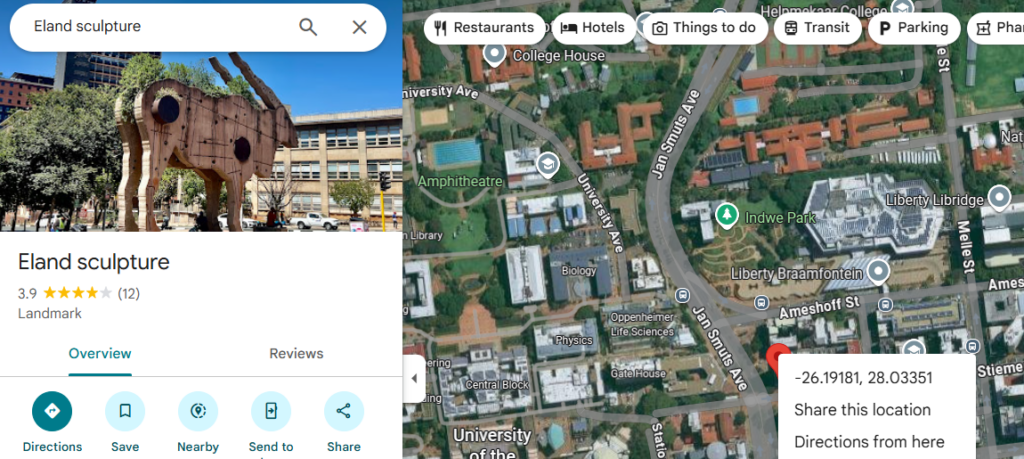
Remember to verify the statement you added with a “reference URL.” The Wikidata entry is far more useful when it can be verified. The eland has plenty of more informative websites to explain the significance of this work.
Step 5 – Add an image
All that is left is to take an image and upload it to Commons. Instructions below are taken directly from Uploading Files CC BY SA
- Go to the Upload Wizard on Wikimedia Commons.
On the first page of the wizard, read the illustration to understand whether Wikimedia Commons can accept your upload. - When you’re ready to upload, click Next near the end of the page.
Click Select media files to share and find the image or images you want to upload from your computer. - Licensing your file
Click Continue and select the options that apply to your upload, as prompted. When you are done, click Next. - Organizing and describing your upload
Enter a title for the image. Use plain, descriptive language. Then enter a description of the image and the date it was created. - Add a category
Help organize Wikimedia Commons by assigning categories to your file. When you are done, click Next.
Copy and paste the URL into the image label. Finished. Hit submit.
This is how you build an item, contribute to Wikidata and show the city’s culture.
P.S. I do not pretend to understand “Freedom of Panorama” (maybe Denise can help). It seems there may be problems with uploading certain pics to Commons. If you are uploading photo’s that you have been given permission to upload, then this release generator is super useful.
References
Minty, Z. (2011) Public Art Project in post-apartheid South Africa:Visual culture, creative spaces and postcolonial geographies.