Please note: This was written by me December 2014, but I am only publishing it now (November 2024) on my blog. I think that the reflections are useful for those who want to run a massive online open course (MOOC).
In education, technology platforms have created expanded possibilities for teaching and learning. At the end of 2014, I flew out to Boston to attend the two-day EdX Training Workshop on the 18th and 19th of November and the EdX Global Forum on the 20th and 21st of November 2014. I had participated in the early constructivist MOOC (later dubbed cMOOC) when I was based in Pietermaritzburg. I was interested in how the academic heavyweights (Harvard, MIT) were adjusting to the social learning approach as they adopted a Massive, Open, Online Course (MOOC) format. I had also heard about MIT Open Courseware (perhaps through Derek Keats?). I wanted to visit their offices. To both pay respects to an awesome initiative and to learn. Then there was also MIT, where Seymour Pappert did his work in the application of computers in the education of children, and developed logo.
Boston is a bit like “Academic Disneyland” and I enjoyed exploring the location of the where the four-day event was held. The training they gave was useful. Krister and Teppo were our hosts, and they showed us how Americans ramp up a scaled-up course.
Some of the training was beyond my comfort zone, and I was pleased to have a manual. Americans always seem to have documentation that is far better than we do. Oddly, for an organization that proclaimed its openness, the course manual wasn’t licensed under a CC BY. Odd. Especially because of the MIT open courseware. But I also sometimes forget.
I did appreciate the workshops, as they had us work on their sandbox site, EDX101, before going live. The sandbox concept for a course was unfamiliar to me. Our LMS (Sakai) had a test server. But we did not do the same for courses. In retrospect, I could see the logic. It gave the course team the impression of an online course before they went about creating a course. It was also a helpful way to teach and explore all the features of the OpenSource EdEx platform before going live and clearing up any bugs, which can quickly wreck a big course.
After the two days of the workshop, it was time to go to the Global Forum—lots of noble ideas about education changing the world. I found myself far more interested in the traditional campus-based courses. External MOOCs were not our focus in the e-learning unit at Wits.
I saw how Harvard University and others experimented with SPOCs (Small Private Online Courses). These small and private courses were restricted access and only for paying students. SPOCs could support blended learning. The MOOC’s online resources and technology could be combined with the personal engagement between academics and students that in-classroom teaching provides. SPOCs and MOOCs were fed off each other. The SPOC would be located within the MOOC-created content. The academic teaching of the course could then draw on MOOC features and course content and utilise these resources with their campus students. The students could also contribute to the MOOC, which would be an amicable symbiotic relationship.
My most significant learning was not during the workshops or the global forum. Instead, it was about the importance of the programme manager who pulled things together, and the place where high-quality video plays in a MOOC course.
Offering a MOOC is a TEAM EFFORT requiring substantial contributions from many people in several different departments across the University. Programme managers play a crucial role in MOOC production. They require significant work experience in project or program management and online course development and are comfortable working in fast-paced, highly collaborative environments.
The key responsibilities of a Program Manager included:
● Serving as the primary liaison between edX and the member institution
● Managing all edX-related operations at the institution, such as selecting, building, and running courses
● Managing course project planning and project management
● Managing coordination and management of tasks, implementation, and post-project review and refinement
● Leading diverse project teams that work with academics, in addition to tracking and communicating project status to all stakeholders
● Responsible for creating and managing course access in studio.edge.edx.org
Video Production
MOOCs rely on multimedia extensively—not the 45-minute format that we usually associate with a lecture but short 5-9minute” lectures.” These lectures usually involve a combination of audio (capturing voice), screencast (capturing a computer screen with software for PowerPoint), demonstration, annotations, and voice, or video recorded in a dedicated studio or lecture venue (See pictures that follow).
After the event, I stayed in Boston for a few days. I realized that that MIT Open Courseware (ocw.mit.edu) had been producing open courseware for over ten years. With Clayton Hainsworth from EdX as my guide, I visited their studio. Here’s what I learned.
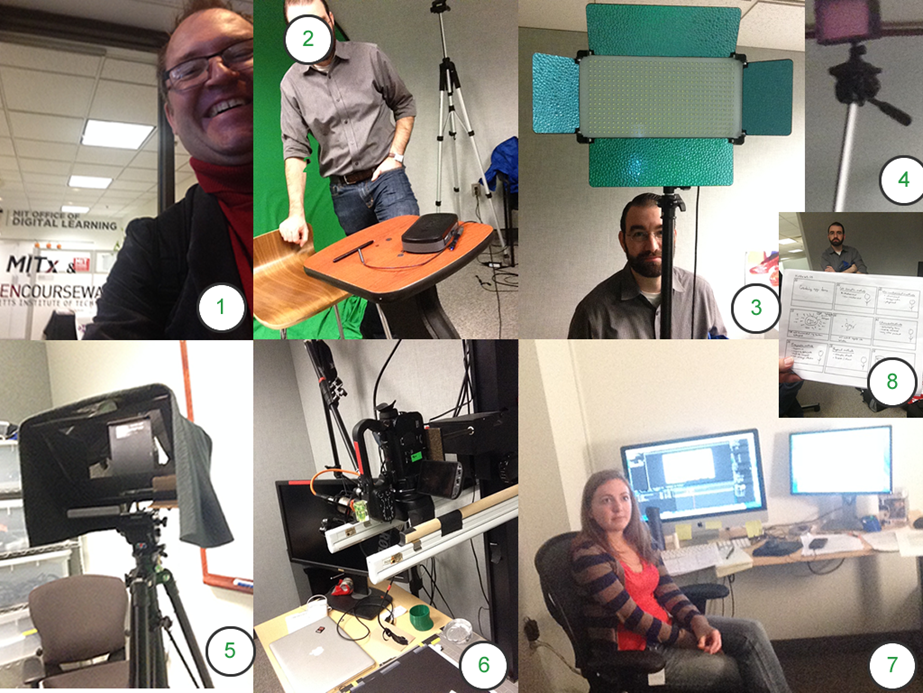
- The EdX studio is neither a large area (4 X 4 m) nor a high-tech space. Almost all pieces of equipment are portable. At the centre of the room are a podium, chair, lapel, boom microphone, and electronic pen. Behind, in the corner, is a large collapsible green screen. The lecturer can then stand or sit in front of a low-budget “green screen”, and video production software is used to superimpose lecture slides behind you.
- Lighting panels are on tripods, and LED lights are used, which reduces the heat, uses less electricity and are much more portable than traditional lighting rigs
- Tripods scattered throughout the room, some with LED lights on, some with microphones, and some unused. The walls behind the tripods are coated in fabric intended to dampen the sound. You can also see a whiteboard pictured behind the tripod. Whiteboards are tricky to film, so they suggested investigating a transparent surface.
- An autocue is set up for the lecturer. The one they used consisted of an iPad mirrored up at 45 degrees and a camera behind the mirrored image.
- The most complex equipment was in one corner of the room. It was a document camera mounted on a customisable stand with a camera and microphone. The purpose of this setup is to allow a student to view the lecturer working through a line of reasoning, but the feedback was that while hands make for a personal approach, it also is more difficult to edit with hands
- Although the room itself had its own editing table and computer, there was also a separate editing room where Britney showed me all the post-production work
- Finally, what held the whole lecturlet together was a storyboard.
The studio is not a high-tech affair, and it is set up so that the equipment can be moved to a lecture venue.
Equipment used for the lecturelet can be divided into three categories:
- Studio
• 1 x podium
• 1 x chair
• 1 x white board
• one electronic pen
• 1 tablet
• 3 x LED lighting and stand
• 1 x boom microphone
• 1 x microphone stand
• 1 x portable microphone (parabolic)
• 1 x popper/windshield
• 1 iPad
• 1 teleprompt
• 1 green screen
• 1 camera - Screen-casting
• An adjustable stand with writing surface, microphone and camera attachments
• Large monitor
• 1 electronic pen
• 1 tablet
• 1 Camera
• 1 x portable microphone (parabolic)
• 1 x Popper/windshield - Post production area
• 1 x 8 channel mixing desk
• 2 x Desk
• 2 x Chair
• 2 x editing computers
• Video and sound editing software
• 2 sets of Licences for software
• 4 x monitors
Sadly the training did not cover important matters like a the “data czar“, a person who could download and decrypt edX data packages. Neither were we shown the edX Data Package, which might have been very helpful for log analysis or formative assessment.
Perhaps this was what the 45 engineers at EdX were still working on?


Great background information about keeping it as simple as you can. I do wonder what a 2024 setup looks like? Harvard’s CS50 suite of courses are so popular that they must do as much via automatic courses as they can!
My interest for next year is to see how to assist with a WordPress-based + GDrive course management setup that is used by the Narrative Therapy training centre I have attended these last two years. Paper portfolio’s of Evidence of the third year students, like me in 2025, are massive and it seems that UP does still require a paper version (I will check). In any case, it would be great to think about this a bit with you and anyone else interested.
Kind regards,
Mario
Sounds like an interesting project Mario. KISS is the way to go. Have you thought of converting a single WordPress instance into a multi site. Lauren has got good instructions (https://laurenhanks.com/converting-a-single-wp-instance-into-a-wp-multisite/). I followed them when I set up FolioFriday.africa