AWA Website (work in progress)
This banner has a gradient background
To create a branded identity for an organization, start with their current colours. I usually generate a colour palette by visiting the organisations website or checking out their logo (the African Wikipedia Alliance has the latter, not the former). I thought I’d help out (hate them to feel excluded).
Wikipedia:Lets_Go
I use a colour picker to assist with the selection of the two hexadecimal colour codes (blue and red) from https://codeforafrica.org/. I then apply CSS to create a gradient effect on the web banner (or hero image). The gradient runs at 45 degrees. The effect is this multi coloured banner (see above) made from two colour codes
- –red #E81020
- –mediumblue #0818E0
Lets start building
This <block> </block> combined with “background-color” gives us a red brick (good for building)

This large heading below <h1>blue heading</h1> combined with “colour:#0818E0;” can give us a blue text colour. H1 also has smaller siblings (all the way to h6)
This is a blue heading

You could also use the word red and blue to determine the brick and heading colours. I prefer hex codes as they are more precise about the colour. So lets go to CodePen and build a bit with headings, blocks and gradients.
- <H4 style=”color:white;”> changes the text colour of a heading
- .block{background: linear-gradient( 45deg, #0818E0 0%, #E81020 100%);} changes the background colour of a block into a gradient which runs at 45%
#0818E0 <—Blue gradient all the way into red —>#E81020
<style>.block{
background:
linear-gradient(
45deg,
#0818E0,
#E81020
);
h4{color:white;}</style>
<br><div class="block"><h4>#0818E0 <---Blue gradient all the way into red --->#E81020</h4></div>It could be a bit difficult to understand this explanation without practice. So I suggest you look at my Codepen example, and then try constructing your own banner on your own Codepen account
Wikipedian ALLIANCE
Thus far I have made use of three colours. As an old forgetful man who tends to forget where he puts his iPad, a central root for all colours is very helpful.
:root {
--primary: #0818E0;
--secondary: #E81020;
--white: #FFF
}
….Now where was I? Oh yes, these three hex codes are a part of my root folder (see above). My primary colour is a colour I drew on frequently. In the block example above, I have chosen to use #0818E0 (blue) as my primary colour. Red (#E81020) was a secondary colour which I can use as an accent, for buttons and lines. I want to change this block into a horizontal navigation bar that has three different buttons. Before, During and After.
Why a root folder? Apart from my forgetfulness, I can place these defined hex codes in the root folder and then call these colour variables in my stylesheet. This allows me to experiment with a different look and feel and if I change a few variable values there is a global change to the page. Here’s an example. Below are the colours from the root folder, that have been placed in two flags from countries I visited recently.
CSS to make flags
<style> .french-flag {
  width: 300px;
  height: 200px;
  border: solid 1px black;
  background: linear-gradient(
    to right,
    #0818e0 0%,
    #0818e0 33.33%,
    #ffffff 33.33%,
    #ffffff 66.66%,
    #e81020 66.66%,
    #e81020 100%
  );
}</style>

<div class="french-flag"></div>
When I was in France at Wikimania 2026, I picked up a lovely booklet about Wikifying a Conference. CSS could allow me to customize the look and feel an existing work and I could put those colours in a root folder..
Bullets,to Buttons, bricks to clicks
Wikipedian ALLIANCE
Within the block with a title and a gradient colour background, I have placed hyperlinked bullets, entitled.
- Before,
- During and
- After
<ul>
  <li><a href="before.html">Before</a></li>
  <li><a href="during.html">During </a></li>
  <li><a href="after.html">After</a></li>
</ul>
CSS can be used to modify these bullets. First we remove the list-style and we then centre the text. With a bit more code, they become buttons. With a blue background and red text.
The CSS to make these buttons is fairly simple. You know all about the root folder by now. We can use the CSS to change the bullets to clickable buttons that change color when pressed.
<style>:root {
--primary: #0818E0;
--secondary: #E81020;

}

horizontalnav {
  display: flex;
  align-items: center;
  justify-content: space-between;
  padding: 1rem 2rem;
  min-height: 80px;
  background: linear-gradient(45deg, var(--primary), var(--secondary));
}

horizontalnav h1 {
  font-size: clamp(1.3rem, 3vw, 2rem);
  color: var(--secondary);
}

horizontalnav h1 span {
  color: white;
  font-family: Georgia, serif;
  font-style: italic;
}

ul {
  display: flex;
  align-items: center;
  gap: 0.5rem;
  list-style: none;
}

a {
  display: block;
  padding: 0.65rem 1rem;
  color: var(--white);
  text-decoration: none;
  font-weight: 600;
  border-radius: 6px;
  transition: background 0.2s, color 0.2s, transform 0.2s;
}

a:is(:hover, :focus-visible) {
  background: var(--primary);
  color: var(--secondary);
  transform: translateY(-2px);
  outline: none;
}
  </style>
<horizontalnav>
      <!-- Always visible items in the nav bar -->
      <h1>
        Wikipedian
        <span>ALLIANCE</span>
      </h1>
<ul>
  <li><a href="before.html">Before</a></li>
  <li><a href="during.html">During </a></li>
  <li><a href="after.html">After</a></li>
</ul>
    </horizontalnav>
Wikipedian ALLIANCE
There we are, a banner with a gradient background a title and three buttons.
Review
I’m hoping that you have seen what I have put together and started building with blocks, banners, colours, gradients, buttons and hyperlinks on an HTML editor out there.
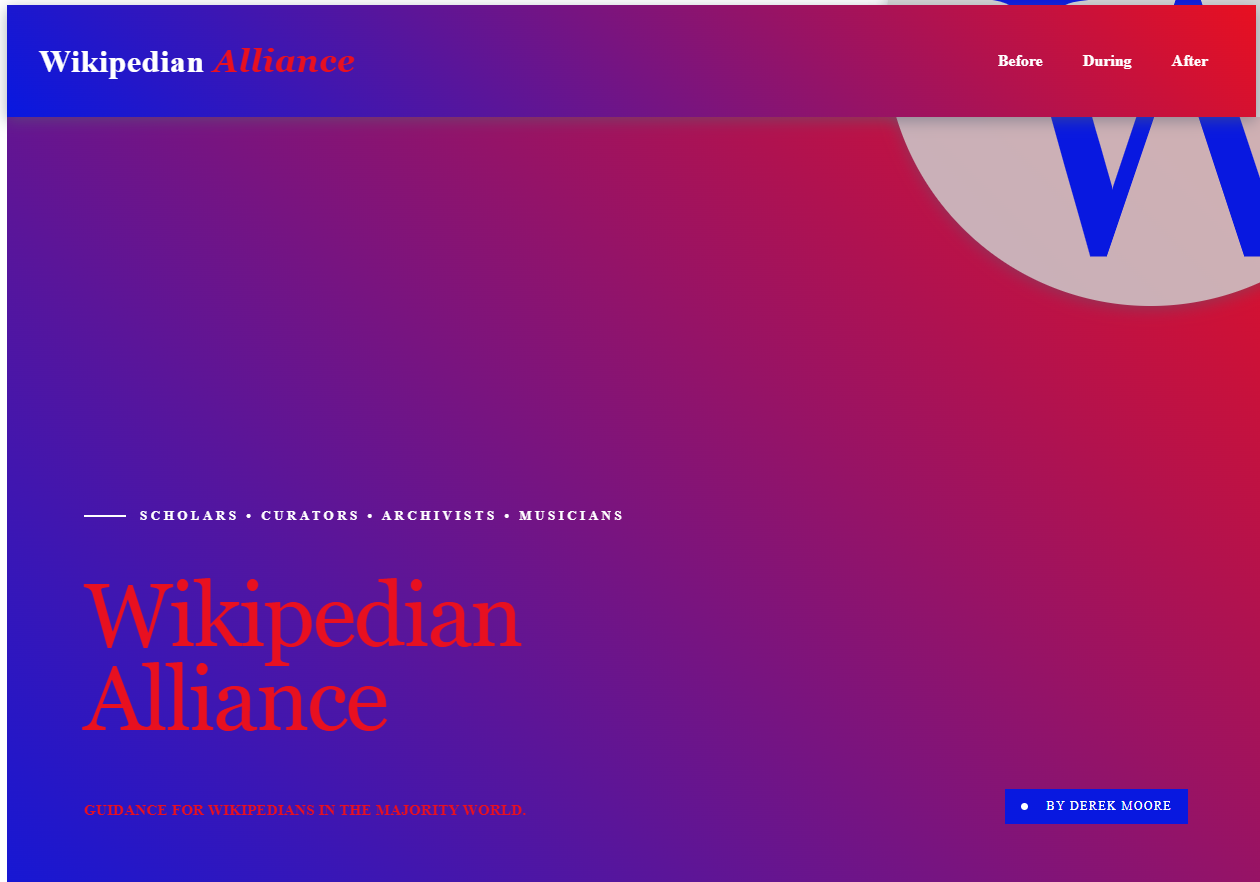
Below you will see that I’ve used the initial color palette in the root folder and added two more colours. The round globe is grey (#CCC) and there is a subtle shadow below the banner (drop-shadow(rgba(83, 97, 116, 0.5) 4px 5px 4px);) You will then see that I have repeated the gradient pattern below the banner. There is a watermark called “W”, an eyebrow “Scholars • Curators • Archivists • Musicians”, the same title (its clickable) and a subtitleand then my name”: “Derek Moore” .
Codepen: CodePen code is MIT licensed. See their terms of Service https://blog.codepen.io/legal/terms-of-service/